

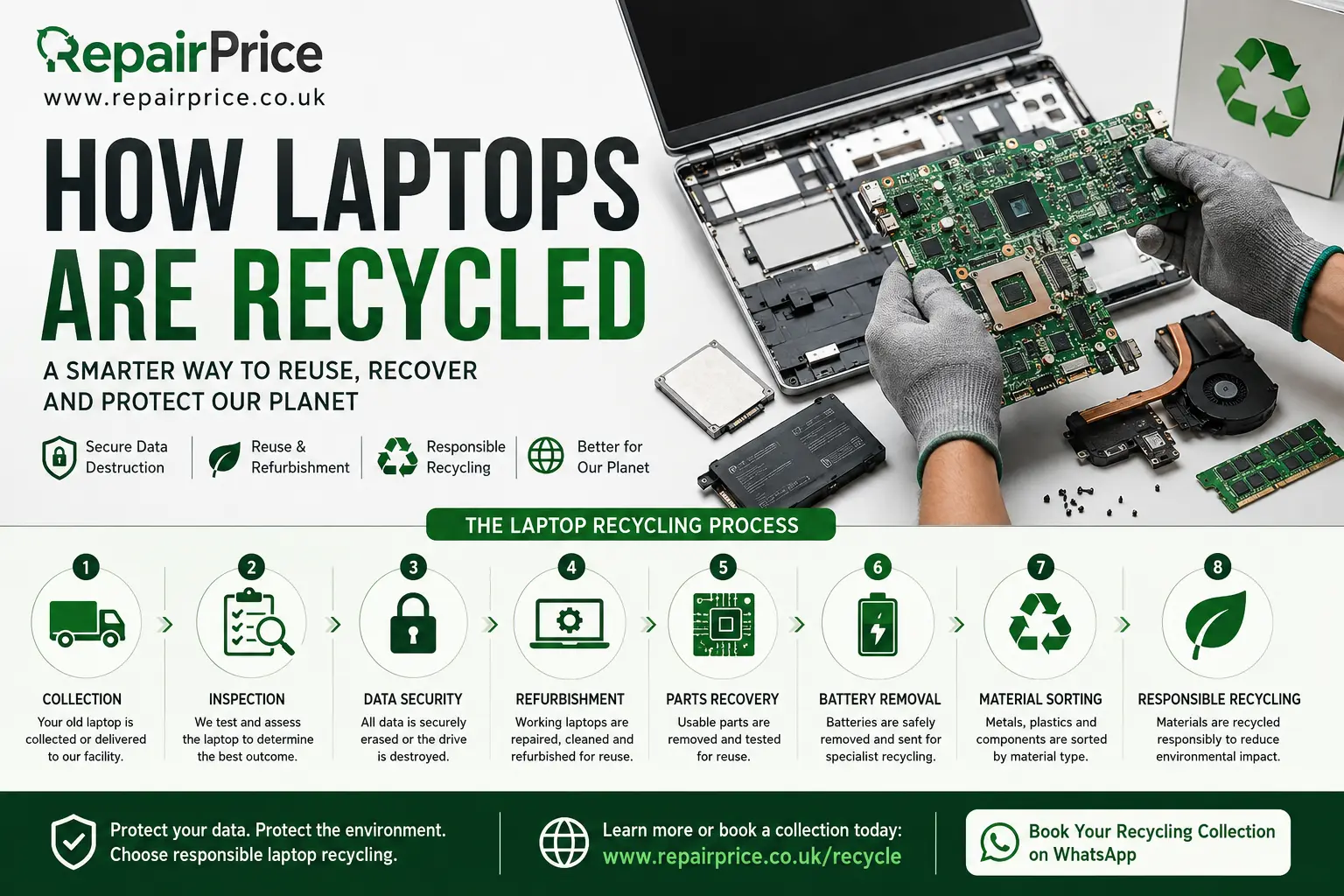
How Laptops Are Recycled: A Complete Guide to Secure and Responsible Laptop Recycling
Old laptops often remain stored in cupboards, offices and spare rooms long after they have stopped being useful. Some have damaged screens, failing batteries or broken charging ports, while others have simply become too slow for modern software. Although an unwanted laptop may appear worthless, it can contain reusable components, recoverable metals and personal information that must be handled carefully.
Professional laptop recycling is designed to protect stored data, recover useful equipment and prevent hazardous electronic materials from being placed in general waste. Instead of allowing an unwanted computer to gather dust or enter landfill, owners can use an approved recycling route that evaluates the device, removes reusable parts and processes the remaining materials responsibly.
RepairPrice helps households and businesses explore suitable options for unwanted technology. You can begin by visiting the electronic device recycling hub or go directly to the dedicated laptop recycling and disposal service.
Arrange Your Laptop Recycling Collection on WhatsApp
Why Responsible Laptop Recycling Matters
Laptops are made from a combination of plastics, aluminium, steel, copper, glass, circuit boards, batteries and electronic components. When these materials are processed through an appropriate recycling system, many of them can be separated and returned to manufacturing supply chains. This reduces the demand for newly extracted raw materials and helps limit the environmental impact associated with producing new electronics.
Throwing a laptop into household waste can create several problems. Lithium-ion batteries may become damaged, circuit boards can contain materials that require controlled treatment, and personal data may remain accessible on the internal storage drive. Responsible recycling therefore involves more than simply collecting the computer. It requires secure handling, assessment, data protection and material separation.
The correct option will depend on the laptop’s condition. A working device may be suitable for reuse or refurbishment. A damaged model might still contain valuable parts. A laptop that cannot be repaired can be dismantled so its storage drive, circuit boards, metals and plastics are directed into appropriate recycling streams.
Step One: The Laptop Is Collected or Delivered
The recycling process begins when the unwanted laptop is collected, delivered or passed to a suitable recycling provider. Households may need to recycle one personal device, while offices, schools, retailers and other organisations may have multiple computers that require organised collection.
Before handing over a laptop, the owner should include any important information about its condition. This may include whether the computer powers on, whether the battery is swollen, whether the screen is damaged and whether confidential information remains on the storage drive. Accurate details help the receiving service decide how the laptop should be handled.
Businesses disposing of multiple machines may also need an inventory showing asset numbers, makes, models and serial numbers. Organisations planning a larger clearance can learn more from the business IT recycling and equipment clearance guide.
Step Two: The Laptop Is Inspected and Categorised
Once received, the laptop is inspected to determine whether it should be reused, repaired, harvested for parts or fully recycled. This assessment is important because extending the working life of a device can often retain more value than immediately breaking it down into raw materials.
A laptop that does not switch on is not necessarily beyond repair. The problem could be caused by a failed charger, damaged charging socket, defective battery, faulty screen, corrupted operating system or replaceable storage drive. Before choosing recycling, owners may compare options through the UK laptop repair quote service.
Repair can be particularly worthwhile when the laptop is relatively recent, meets the owner’s performance needs and has only one identifiable fault. Recycling may be more appropriate when the machine is severely damaged, unsupported, uneconomical to repair or no longer suitable for its intended purpose.
Step Three: Personal and Business Data Is Protected
Data protection is one of the most important parts of laptop recycling. A computer may contain saved passwords, photographs, financial documents, customer records, browser history, emails, work files and other confidential information. Deleting files or emptying the recycle bin does not always remove data permanently from the storage device.
Where the laptop still works, important files should be backed up before the equipment is released. Accounts should be signed out, linked devices should be removed, and any available factory-reset or secure-erasure procedure should be completed. The correct process can vary depending on the operating system, drive type and sensitivity of the stored information.
If the laptop does not work, its hard drive or solid-state drive may need to be removed and processed separately. Businesses handling confidential or regulated information should use an appropriate data-destruction procedure and retain any records required by their internal policies.
For a more detailed explanation of erasure, drive handling and physical destruction, read the secure data destruction before electronics recycling guide.
Step Four: Reusable Laptops May Be Refurbished
After data has been handled correctly, a reusable laptop may enter a refurbishment process. Technicians can test the keyboard, display, battery, ports, memory, storage, cooling system, wireless connectivity and power supply. Faulty or heavily worn components may be replaced before the operating system is reinstalled.
Refurbishment can involve installing a new storage drive, increasing memory, replacing a battery, repairing a charging socket or fitting another screen. The objective is to return a suitable machine to reliable working condition rather than dismantling equipment that still has practical value.
RepairPrice also connects users with location-focused repair options. Laptop owners in West Yorkshire can explore Bradford laptop repair specialists, laptop repair services across Leeds, or computer repair options in Halifax.
Further local coverage is available through Wakefield laptop repair providers and Huddersfield laptop repair shops. Comparing repair options before recycling can help prevent a serviceable computer from being discarded unnecessarily.
Step Five: Useful Components Are Removed
If a complete laptop cannot be refurbished, individual components may still be suitable for reuse. Depending on the model and condition, recoverable parts can include memory modules, storage drives, wireless cards, keyboards, screens, cooling fans, speakers, hinges, chargers and casing sections.
Component harvesting reduces waste and can provide replacement parts for compatible repairs. Each recovered item must be inspected because water exposure, impact damage, overheating or electrical faults can affect reliability. Parts that fail testing should move into a suitable recycling stream instead of being reused.
Storage drives require special attention because they may contain both reusable hardware and sensitive information. A working drive may be securely erased before reuse. A failed or confidential drive may require controlled destruction before the circuit board, casing and other materials are processed.
Step Six: The Battery Is Removed Safely
Most modern laptops use rechargeable lithium-ion or lithium-polymer batteries. These batteries must be removed and handled separately because damage, puncture, heat or incorrect storage can create a fire risk. A swollen battery should not be pressed, bent or placed into household rubbish.
Battery removal may be straightforward on older laptops with detachable packs. On slimmer machines, the battery is often fixed inside the case and connected to the motherboard. Internal battery removal should be completed carefully to avoid damaging the battery cells or surrounding components.
Once separated, laptop batteries are sent to an appropriate treatment route where recoverable materials can be processed. The laptop body can then continue through dismantling without the battery presenting an unnecessary risk to workers or recycling equipment.
Step Seven: Circuit Boards Are Separated
The motherboard and smaller electronic boards are among the most complex parts of a laptop. They contain connectors, processors, memory chips, controllers and small quantities of metals that can potentially be recovered through specialist processing.
Laptop circuit boards should not be treated in the same way as ordinary plastic or mixed metal. They require a dedicated recycling process that may involve sorting, shredding and further material recovery. More information is available through the specialist laptop circuit board recycling service.
The circuit board attached to a storage drive can also be separated for controlled processing. Organisations and recyclers handling these components can review the hard-drive PCB recycling information.
Where equipment clearances include desktop computers as well as laptops, compatible boards can be directed through the PC motherboard and circuit board recycling route.
Step Eight: Metals, Plastics and Other Materials Are Sorted
After batteries, drives, screens and circuit boards have been removed, the laptop casing and remaining structure can be broken down into material categories. Aluminium frames, steel brackets, copper wiring and other metals can be separated from plastics and mixed electronic parts.
Mechanical processing may be used after manual dismantling to reduce materials into smaller fractions. Magnets, screening equipment, density separation and other techniques can help distinguish ferrous metals, non-ferrous metals and plastics.
The quality of the recovered material depends on how effectively the laptop was sorted before processing. Keeping batteries, displays, circuit boards and storage devices separate can improve safety and reduce contamination between recycling streams.
What Happens to a Laptop Screen?
Laptop displays contain several layers, including the outer panel, liquid-crystal or display assembly, backlight components, films, wiring and a supporting frame. A working screen may be recovered for use as a tested replacement part. A cracked or defective display usually requires controlled dismantling.
Screen construction varies between models, so treatment methods may differ. Older display technologies can require different handling from newer LED-backlit panels. The display should therefore remain intact until it reaches a recycler or technician equipped to process it appropriately.
Should You Repair or Recycle Your Laptop?
The decision should be based on the laptop’s age, specification, condition, repair cost and future usefulness. A broken screen or exhausted battery does not automatically mean the entire computer should be recycled. A targeted repair may provide several more years of service.
Recycling becomes more practical when several major parts have failed, liquid damage has affected the motherboard, the casing is severely damaged or the machine cannot support required software. It may also be appropriate when a business is replacing older equipment that no longer meets security or performance requirements.
Repair and recycling should be considered together rather than treated as competing options. The preferred route is usually to maintain and repair suitable equipment, reuse working machines, recover serviceable parts and recycle only the materials that cannot be used again.
Compare Laptop Repair and Recycling Options
Recycling Other Devices Alongside a Laptop
Laptop clearances often include other unwanted technology. Old tablets, mobile phones, chargers, keyboards and computer accessories should be sorted rather than placed into mixed household waste. Consolidating compatible equipment can make a home or business clearance easier to manage.
Unwanted portable devices can be processed through the dedicated tablet reuse and recycling service and the mobile phone recycling pathway.
Before recycling a damaged companion device, it may also be worth checking whether it remains economical to fix. RepairPrice provides access to tablet repair quotation options and a separate mobile phone repair comparison service.
How Businesses Should Prepare Laptops for Recycling
Businesses should create a clear process before releasing computers for recycling. Equipment should be recorded, labelled and matched against an asset register where one exists. Staff should confirm which files must be retained and whether any devices are subject to legal, contractual or internal retention requirements.
Data-bearing equipment should be separated from ordinary accessories. Chargers, docking stations and reusable peripherals may have continued value even when the original laptop is no longer required. Keeping related items together can also improve the chance of a working device being reused.
Organisations should ask how their equipment will be assessed, how stored information will be protected and what happens to machines that cannot be refurbished. A clear audit trail is particularly important when computers have held customer, employee, financial or operational records.
Common Mistakes to Avoid
One common mistake is placing a complete laptop in a general waste bin. Another is assuming that deleting visible files has permanently removed all stored information. Owners should also avoid dismantling swollen batteries, smashing storage drives without suitable controls or leaving confidential devices with an unknown recipient.
Removing valuable components before arranging recycling can sometimes reduce the likelihood that the remaining machine will be reused. Unless there is a specific data-security reason to retain the drive, it may be better to allow the receiving service to assess the complete laptop and determine the most appropriate route.
Owners should also avoid delaying action indefinitely. Batteries can deteriorate during long-term storage, and unused computers may become less suitable for refurbishment as their hardware becomes older. Arranging assessment promptly can preserve more reuse and recovery options.
How Laptop Recycling Supports a Circular Approach
A circular approach aims to keep products, components and materials in use for as long as reasonably possible. For laptops, this begins with maintenance and repair. When the complete device is no longer viable, reusable components can be recovered. After that, metals, plastics and circuit-board materials can be processed for recycling.
This approach reduces unnecessary disposal and helps retain the value already invested in manufacturing the computer. It also encourages consumers and organisations to view unwanted electronics as a source of recoverable equipment and materials rather than ordinary rubbish.
To see how assessment, reuse, dismantling and material recovery fit together across different electronics, visit the complete device recycling process guide.
Frequently Asked Questions About Laptop Recycling
Can a laptop be recycled if it no longer switches on?
Yes. A non-working laptop can still contain reusable parts and recyclable materials. Its battery, storage drive, circuit boards, metals and plastics can be assessed separately. The storage device should still be treated as containing data even when the laptop does not power on.
Do I need to remove the hard drive?
Not in every case. A suitable recycling service may be able to erase, destroy or process the drive. However, businesses and owners of highly confidential information may choose to remove it or arrange a documented data-destruction service.
Can a damaged laptop battery be recycled?
Yes, but it must be handled carefully. A swollen, leaking, punctured or overheating battery should not be placed in household waste or posted without appropriate arrangements. Explain the battery’s condition before collection or delivery.
Is an old laptop worth repairing?
It may be worth repairing when the computer still meets the owner’s needs and has a limited fault such as a failed battery, broken screen, damaged keyboard or defective storage drive. A repair quotation can be compared with the cost and practical benefits of replacing the device.
What parts of a laptop can be recovered?
Recoverable items can include memory, storage drives, screens, keyboards, wireless cards, speakers, cooling fans, chargers, casing parts and circuit boards. Whether a component can be reused depends on its condition, compatibility and test results.
Arrange Responsible Laptop Recycling
Recycling a laptop correctly helps protect personal information, recover reusable components and prevent electronic materials from being discarded unnecessarily. The process normally includes collection, inspection, data handling, refurbishment assessment, battery removal, component harvesting and specialist material separation.
Before disposing of your computer, consider whether a practical repair could extend its life. When repair is no longer economical, choose a recycling route that can assess the complete device, protect the storage drive and direct each component into an appropriate reuse or treatment stream.
RepairPrice can help households and businesses explore repair, reuse and recycling options for laptops and related electronics. Start with the dedicated laptop recycling page, compare repair services where appropriate and arrange responsible handling for equipment that has reached the end of its useful life.